Create Wellness
Native Search ad example
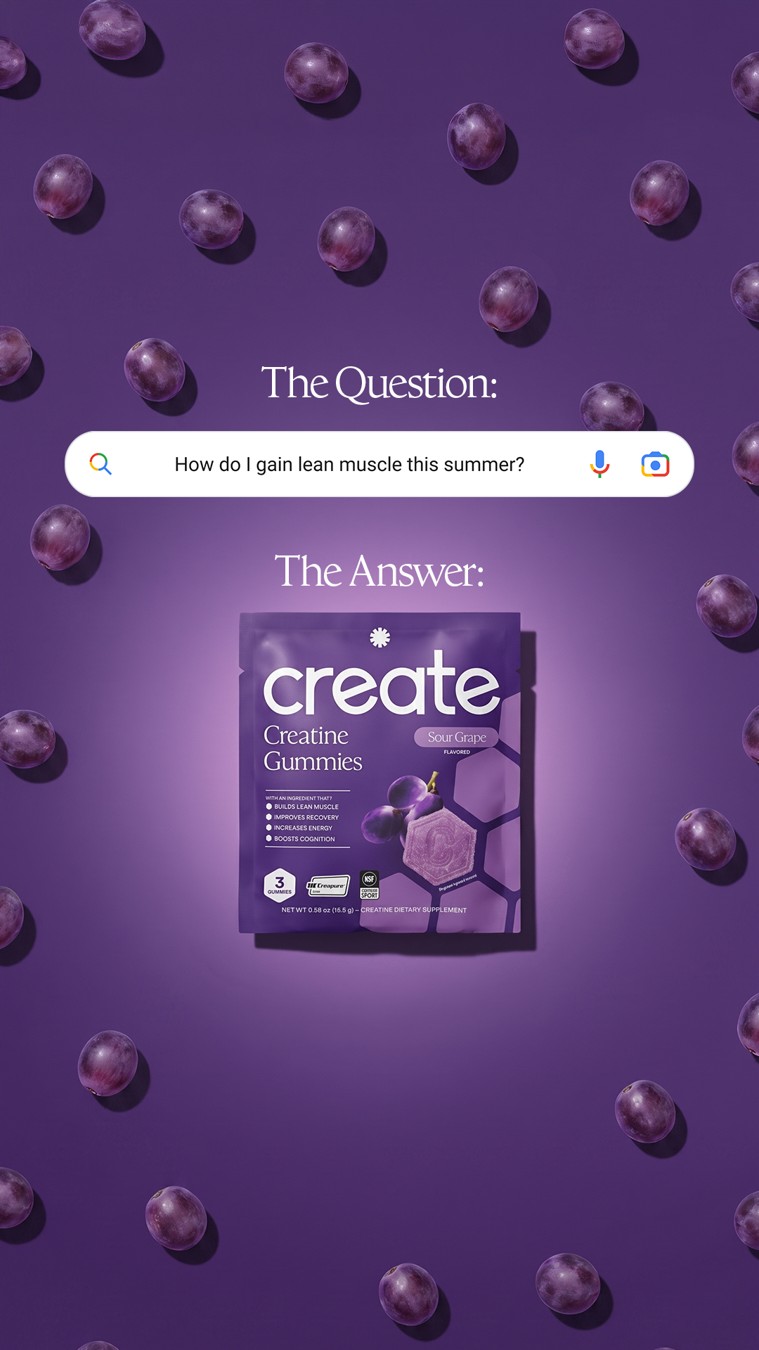
A search-style question sits above the Create pack, with gummies scattered across a purple background. The question and answer labels establish the reading order.
What to borrow
The layout makes a customer question the entry point, then gives the product a clear place in the answer. The suggestion field is part of the ad artwork, not evidence of a search ranking.
For your brand
Start with a question your audience actually asks. Place your product below it and use a short, supported answer in your own voice. Keep the colors and search-field styling specific to your brand.
Read the creative recipe
Creative recipe: Put the question above the product.
Reference: https://usebassline.com/library/ads/examples/107841cb6e7e56d1a4a555941e9d5728241c504c19f0fe11a9881dbbf7bbc6c6
Source advertiser: Create Wellness
Format: Native Search

Composition: Portrait frame. Short question label and an original search-style field in the upper third; answer label and product hero below. A restrained pattern of product-related objects connects the background.
Creative direction: Start with a question your audience actually asks. Place your product below it and use a short, supported answer in your own voice. Keep the colors and search-field styling specific to your brand.

Before generating, ask me for:
1. Brand profile: logo, colors, fonts and voice.
2. Product: exact name, owned product images and verified details.
3. Audience: who this is for and the question or need to address.
4. Brief: goal, placement, aspect ratio and call to action.
5. Talking points: the one main message and facts that support it.

Use the reference for structure, not a copy of its artwork or wording. Keep my product identity accurate. Use owned or licensed assets and only supported claims. Do not invent testimonials, ratings, endorsements or performance numbers.
Draft the direction for my review. After I approve it, help me generate, revise and save my version.